

Search for a "WhatsApp store builder" and you will find tools that want you to build a website first: pick a theme, set up pages, connect payments, then add a WhatsApp button. For many small sellers that is a lot of work for something much simpler.
This guide explains what a WhatsApp store really needs, how a catalog link with WhatsApp ordering covers it without a website, and, just as important, when you are better off with a full store builder.
What a "WhatsApp store" really is
Strip away the website, and a WhatsApp store is three things:
- Products to browse. Photos, names, prices and variants in one place, so buyers don't have to ask "what do you have?".
- A way to choose and order. Something that turns "I'd like a few of those" into a clear list: which product, which variant, how many.
- You, on WhatsApp. The order arrives in a chat, where you confirm stock, agree payment and arrange delivery.
If that is how you sell, through chats, to regulars, at markets or to shops, a catalog with WhatsApp ordering gives you all three. You don't need to build a website around it.
Store builder or catalog link: what each gives you
Here is an honest side-by-side. The store-builder column is general, because builders differ; check the one you are looking at.
| Typical store builder | EasyCatalog catalog link | |
|---|---|---|
| Own domain | Usually yes | No: links live on easycatalog.com |
| Product pages in search | Usually yes | No |
| Card checkout | Yes | No, you agree payment with the buyer (Shopify stores also get a Retail link to their Shopify checkout) |
| Shipping and tax rates | Usually yes | No |
| Catalog PDF | Depends on the builder | Yes, a designed PDF from the same catalog |
| Order with a cart | Yes | Yes, in the Wholesale order form |
| Order sent to WhatsApp | Depends on the builder | Yes: the whole order from the order form, and a product request from the Showcase |
| Setup | Theme, pages, payments, shipping | Pick a template, add products, generate |
Build your WhatsApp store from a catalog
The whole setup is four steps. How to sell on WhatsApp walks through each one in detail.
- Make the catalog. Open Create catalog, pick a template and add your products, from a spreadsheet, a Google Sheets link, your website, a product feed or a quick table. No account is needed until you save.
- Generate it. Your Catalogs page then shows the catalog's PDF, Wholesale and Showcase links.
- Switch on WhatsApp ordering in Wholesale rules, Showcase options or both, with your number in international format.
- Share the link in chats, your status, your bio, or as a QR code with Get QR.
Order forms, WhatsApp ordering, share links, password protection and order emails come with every paid plan; see pricing.
Two shop windows from one catalog
One catalog gives you two links, and each can send buyers to WhatsApp in its own way. Each one takes its own WhatsApp number, so retail and trade orders can go to different people.
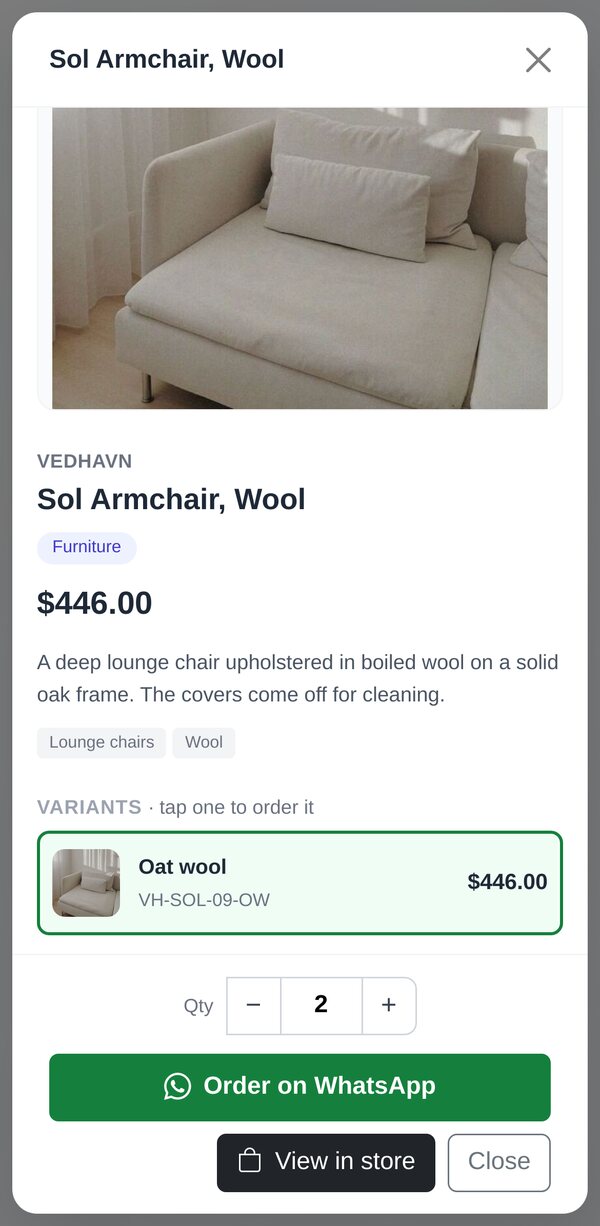
The Showcase is your shop window. Shoppers flip through the catalog and tap a product to see its details. With WhatsApp ordering on, that popup has a quantity box and an Order on WhatsApp button. The message names the product, the variant, the SKU when you show SKUs, the quantity and a link back to the catalog. It never includes a price, and it is not saved as an order: it starts a conversation, and you agree price, payment and delivery in the chat.
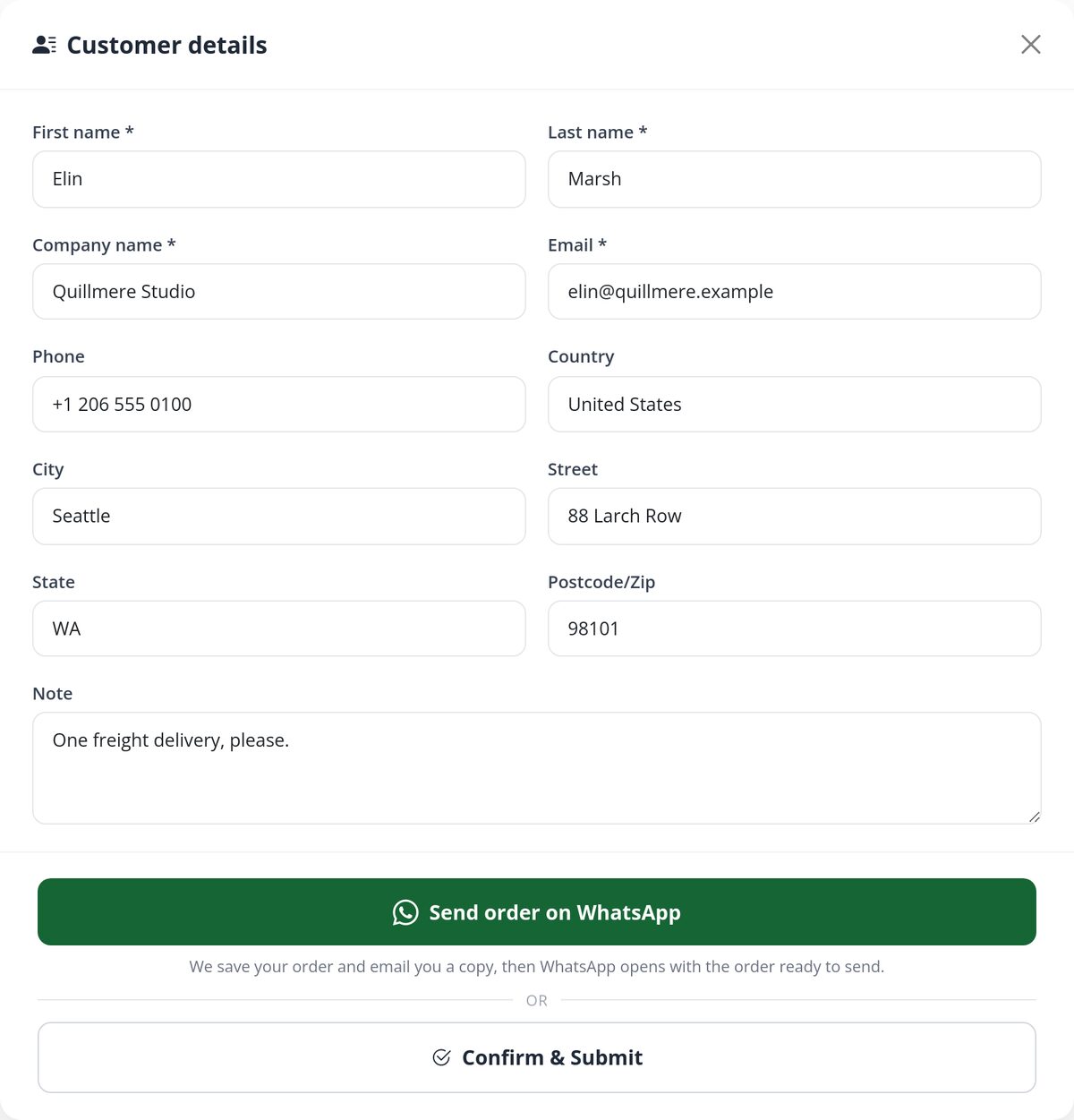
The Wholesale link is your order counter. Buyers set quantities across the catalog, open the cart and enter their details. A green Send order on WhatsApp button sits above Confirm & Submit. By default the order is also saved under Orders and emailed, and the WhatsApp message carries its order number. Your minimum order value is checked again before WhatsApp opens.
Use the Showcase for one-off shoppers and the Wholesale link for repeat buyers and bigger orders, or send both. The WhatsApp ordering setup guide shows both settings step by step.

Make it feel like a store
A good shop window is more than a product grid. A few touches make your catalog feel like a place to buy from:
- A cover and a welcome. Your catalog can open with a cover and content pages such as Welcome, Contents and How to order. A short "How to order" page that says "tap a product, then Order on WhatsApp" removes the guesswork.
- Prices your way. Show prices for retail, or hide them on the order form for trade buyers you quote personally; ordering still works.
- A password for trade. Lock a catalog so only buyers with the password can open it and order.
- Phone-friendly ordering. The order form has a mobile layout, which matters when most links are opened from a chat.
- A QR code at the counter. Print the link's QR code on a sign or a price list, so walk-in customers can reorder later.
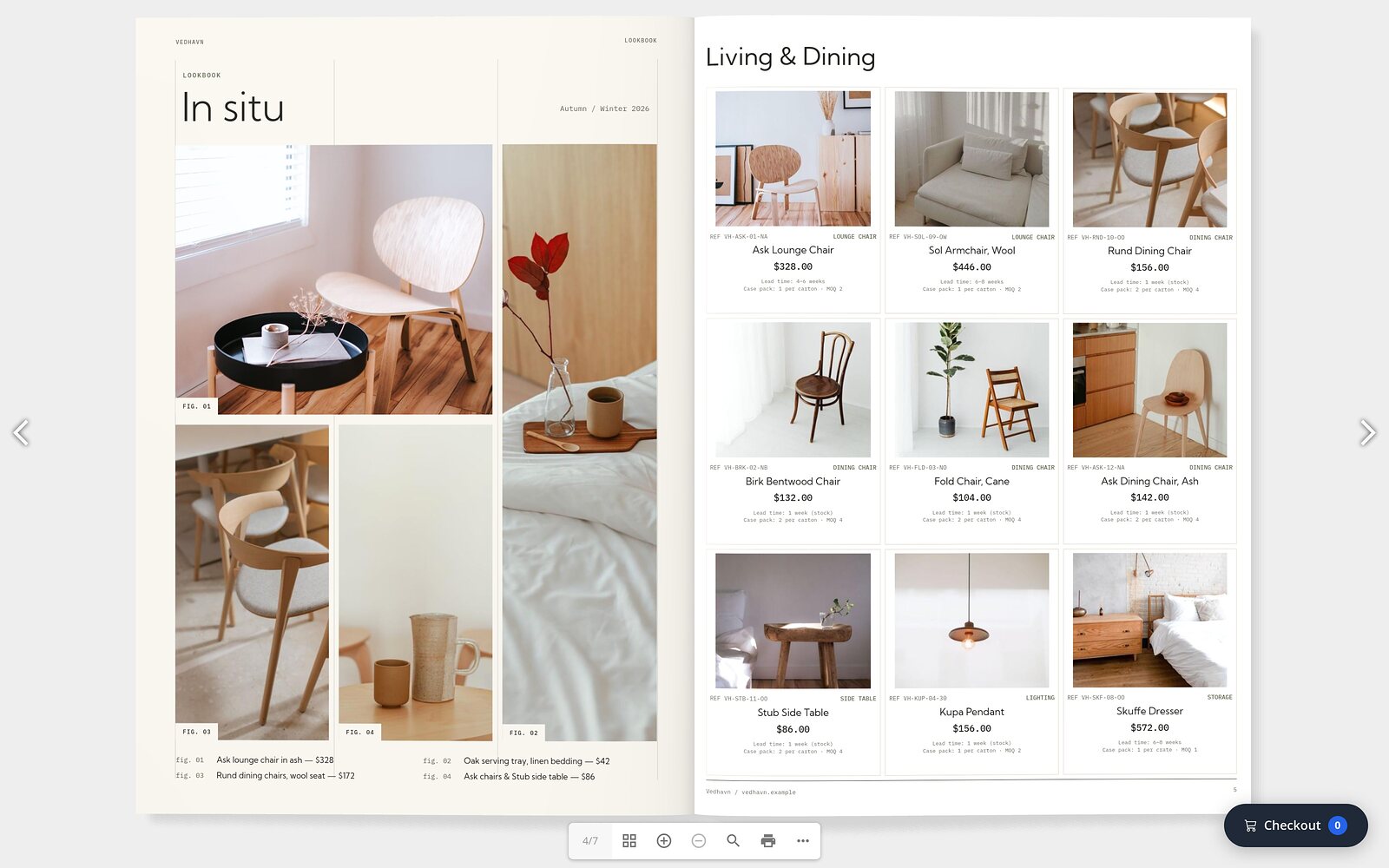
Browse the catalog templates to see the covers and page styles you can start from.
When you need a real store builder
A catalog link is not the right tool for every seller. A full store builder is the better choice when:
- Buyers must pay at checkout. If you want card payments taken automatically, without a conversation, you need a store with checkout.
- You ship to strangers at volume. Shipping rates, tax and order-by-order fulfilment without a chat are what store platforms are built for.
- You want traffic from search. Product pages on your own domain can be found in search engines. Catalog links are made to be shared.
You can also have both. EasyCatalog is a Shopify app too: Shopify stores get the same WhatsApp ordering, plus a Retail link whose cart goes to the Shopify checkout. And if a store is more than you need for now, a catalog without an online store is a fine place to start.
Questions about WhatsApp stores
Is a catalog link a real online store?
Not in the usual sense. It is your catalog with a way to order: buyers browse, fill a cart or pick a product, and send the order to you. There is no checkout and no card payment for accounts without Shopify, so you agree payment and delivery with the buyer.
Do buyers need an account or an app?
No account. Buyers open your link in their browser. To send an order on WhatsApp they need WhatsApp, on a phone or a computer. Buyers without it can still use Confirm & Submit on the order form.
Can I use my own domain?
No. Your catalog links live on easycatalog.com, for example easycatalog.com/showcase/… and easycatalog.com/w/…. You can put those links anywhere: in chats, your bio, emails or a QR code.
Can I change prices later?
Yes. Edit the catalog and generate it again. The links keep their address, so buyers who already have the link see the new prices.
Do I need an account to start?
No. You can pick a template and add your products on the Create catalog page without an account, and sign up when you save the catalog or generate its PDF.
Open your WhatsApp shop window
Pick a template, add your products and share one link. No website to build.